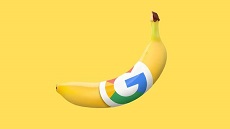
Let’s be real. AI has totally shaken up how digital images get made, edited and reworked. You don’t have to lean only on manual selections, layers, masks and complicated adjustments anymore. Modern image models can understand plain-language instructions. And make visual changes for you. Automatically. One name that keeps popping up here? Nano Banana 2.5. It’s a term tied to Google’s Gemini image-model family and AI image workflows.
Knowing how these systems actually work is handy for pretty much anyone. Whether you’re into digital design, content creation, photography, marketing visuals, or just messing around creatively.
What Is Nano Banana 2.5?
So, what’s Nano Banana 2.5, really? People usually link it to the original Nano Banana model. Its official name is Gemini 2.5 Flash Image. But here’s something worth knowing. Don’t mix it up with later models like Nano Banana 2 and Nano Banana Pro. Model names can get used differently across platforms and online chatter. So it’s easy to get confused.
At the most basic level, these AI image systems let you describe the image you want. Or a change to a picture you already have. In normal, everyday words. The model reads your instructions. Then creates or changes the visuals to match.
Say you want a background gone. Instead of removing it by hand, you just describe what should replace it. Easy. Or you hand over an existing photo as a reference. Then tell it what to change. The lighting, the scenery, the colors or specific objects.
How AI Image Generation Works
Traditional digital image creation usually means a whole string of manual steps. A designer might have to select objects. Tweak colors. Build masks. Change backgrounds. And juggle a bunch of layers. Kind of a grind.
Generative image models do it differently. They work out how words connect to visual elements. Then they produce an image based on what you told them.
A typical workflow goes through three stages:
- Describe the idea: You write a prompt explaining the subject, setting, style, lighting and composition.
- Generate or modify: The AI reads your prompt and creates a visual result.
- Review and refine: You take a good look at what came back. Something off? Give it more instructions.
Reference images give you even more control. Because the model’s got actual visuals to work from. Not just your written description.
Text-to-Image and Image-to-Image Editing
AI image tech usually falls into two connected camps. Text-to-image generation and image-to-image editing.
Text-to-image systems start with words. Your prompt might ask for a landscape, a product concept, an illustration, a portrait or a poster. And the image gets generated based on what you wrote.
Image-to-image editing starts with a visual you already have. Then you ask for specific changes. While telling the system to keep the important stuff the same. That’s super useful when the original composition, subject or product needs to stay recognizable.
Modern creative platforms might mix both approaches into one workflow. For example, Nano Banana 2.5 can be explored alongside broader AI image-generation and editing workflows. Where you can work from written ideas or reference images.
Why Natural-Language Editing Matters
One of the biggest leaps in AI image editing? Being able to describe changes like you’re just having a chat.
You might write something like, “Replace the background with a quiet outdoor café while keeping the person, pose, and facial features unchanged.” That kind of instruction does two jobs at once. It says what you want changed. And what needs to stay put.
The more precise your prompt, the clearer the direction. So don’t just say “make it better.” Not much to work with, right? Point out the exact problem instead. Too many shadows. An object you don’t want. A background that doesn’t fit. Or a color that’s just off.
And that’s what makes AI editing so accessible. Even for people who’ve never really touched professional graphics software.
Common Applications
AI-powered image models can help with loads of creative tasks.
Product Visualization
Businesses and designers can try out product scenes without shooting every possible setting. That’d take forever. An existing product photo can act as the reference. While the environment around it gets swapped out.
Social Media Graphics
Creators can come up with visual ideas for posts, stories, thumbnails and other digital formats. And they can play around with different aspect ratios and compositions while they’re still drafting.
Concept Development
Artists and designers can use generated images to test ideas. Before sinking a ton of time into detailed production. A rough visual can help get across a character, a setting, a composition or a mood you’re thinking about.
Photography Editing
AI editing can help with background changes, removing objects, adjusting lighting and other tweaks. But always double-check generated changes. Especially when photographic accuracy really matters.
Writing Better AI Image Prompts
A good prompt usually covers the subject, the action, the setting, the visual style, the composition and any important limits.
When you’re editing an existing image, it also helps to say what can’t change. Like the person’s identity. The product’s shape. The camera angle. The clothing. Or the overall layout.
Oh, and here’s a handy habit. Make one big change at a time. Say one prompt asks for a new background, different lighting, an object removed, new typography and a totally different art style. All at once. Something goes weird? Good luck figuring out which instruction caused it.
Limitations and Quality Checks
AI-generated images aren’t automatically accurate. Not even close. Small text, hands, faces, product labels, architectural details and complex patterns can end up with mistakes. Or changes you never asked for.
That really matters for professional or factual content. If an image shows a real product, place, person, scientific subject or event, compare the final result with reliable source material. Don’t just eyeball it.
And hang on to your original image when you’re making big edits. Here’s why. AI systems might rebuild areas that were hidden behind an object or removed during editing. So the new image doesn’t necessarily show what was actually there in the original photo. It’s filling in the gaps with guesses. CapCut’s own guidance on object removal says the same thing. Check the rebuilt areas. And keep the source image.
The Future of AI Image Editing
AI image tech is heading toward workflows where generating and editing aren’t so separate. Instead of making an image first and then jumping into a different app for every fix, you’ll more and more just describe a series of changes. All in one creative space.
And the biggest win might not just be faster image generation. Better control, consistency, keeping references intact, readable text and predictable editing? Those matter just as much for real creative work.
As this tech keeps growing, a few skills will stay essential. Writing precise prompts. Judging what you get back. And knowing the difference between creative reconstruction and factual images. AI can seriously lower the technical hurdles in making visuals. But you still need a human checking the final image. Making sure it actually does what it’s supposed to.